A broken phone screen can happen in seconds. One accidental drop onto concrete, tile, or even a hard wooden floor can leave your device with anything from a tiny crack to a completely shattered display. While a cracked screen is frustrating, it doesn’t always mean your phone is beyond repair. In many cases, you can continue using it safely for a short period, apply a temporary fix, or choose between a DIY repair and a professional replacement based on the extent of the damage.
Before rushing to replace your phone, it’s important to understand what has actually broken. Sometimes only the outer glass is cracked, while the touchscreen and display continue to work normally. Other times, internal components such as the digitizer or OLED/LCD panel are damaged, causing flickering, black spots, colored lines, or an unresponsive touchscreen.
This comprehensive guide explains how to fix a broken phone screen safely and effectively. You’ll learn how to assess the damage, protect your phone from further harm, explore temporary solutions, and determine whether repairing or replacing the screen is the smartest option. Whether you’re looking for how to fix a broken phone screen at home, how to fix broken screen on Android phone, or wondering how to fix a broken phone screen without replacing it, this guide provides practical, expert-backed advice to help you make the right decision.
Quick Answer
If your phone screen is broken, first determine whether only the glass is cracked or if the display itself has been damaged. Minor cracks can often be protected temporarily with a tempered glass screen protector or clear tape until you arrange a repair. However, if the display shows black spots, flickering, colored lines, or stops responding to touch, the screen assembly usually needs replacement. Before attempting any repair, back up your data and avoid using the phone if the battery appears swollen or the device becomes unusually hot.
How to Tell How Bad Your Phone Screen Is
Not every cracked phone screen requires the same solution. The first step is identifying the type of damage you have. Understanding the symptoms can save you money, prevent unnecessary repairs, and help you avoid making the problem worse.
Modern smartphones consist of several layers:
- Protective glass
- Touch-sensitive digitizer
- LCD or OLED display panel
- Internal connectors and cables
Damage may affect only one layer or several at once.
Hairline Cracks
Hairline cracks are thin surface fractures that usually appear after a light drop. They often don’t interfere with the touchscreen or display quality.
Common signs include:
- Touchscreen responds normally
- No display discoloration
- No flickering
- No black spots
- Phone functions as expected
Although these cracks seem harmless, they can spread over time due to pressure, temperature changes, or additional impacts.
Recommended action: Apply a tempered glass screen protector, use a sturdy phone case, and monitor the crack. If it begins spreading, plan for a screen replacement.
Deep Cracks and Spiderweb Damage
Deep cracks usually spread across the screen in multiple directions, creating a spiderweb appearance. Pieces of glass may begin lifting from the surface, making the device uncomfortable or unsafe to handle.
This type of damage increases the risk of cuts, dust entering the phone, moisture damage, and further cracking. Even if the display still works, deeper cracks weaken the structural integrity of the screen.
Recommended action: Protect the screen immediately and arrange a replacement before the damage worsens.
Black Spots or Ink Bleeding
Black patches that gradually grow across the display usually indicate internal LCD or OLED damage rather than cracked glass.
Unlike surface cracks, these spots won’t disappear with temporary fixes.
Common symptoms include:
- Black circles
- Purple blotches
- Dark patches
- Missing portions of the display
These signs almost always require professional screen replacement.
Flickering Display
If your screen flashes, dims unexpectedly, or changes brightness after being dropped, the display panel or internal connectors may have been damaged.
Possible causes include:
- Loose display connector
- OLED panel damage
- LCD failure
- Internal impact damage
Continuing to use a flickering screen may make the issue progressively worse.
Touchscreen Stops Responding
Sometimes the display appears perfectly normal, but the touchscreen becomes slow or completely unresponsive.
This usually indicates digitizer damage.
Typical symptoms include:
- Ghost touches
- Delayed responses
- Certain areas don’t register touch
- Random taps without user input
Because the digitizer is often bonded to the display, replacing the complete screen assembly is typically the most effective solution.
Colored Lines Across the Screen
Many users search for how to fix a broken phone screen with lines after noticing green, purple, pink, or white lines running vertically or horizontally across the display.
Unfortunately, colored lines usually indicate damage to the display panel or internal display cable rather than the outer glass.
If you’re searching for how to fix a broken phone screen with lines at home, restarting the phone may help only if the issue is software-related. If the lines appeared immediately after a drop, the display assembly generally needs replacement.
Phone Screen Damage Comparison
| Symptom | Likely Cause | Temporary Fix Possible? | Recommended Solution |
| Small crack | Outer glass | Yes | Screen protector and monitor |
| Spiderweb cracks | Glass damage | Short-term only | Replace screen |
| Black spots | LCD/OLED damage | No | Screen replacement |
| Flickering | Display damage | No | Professional repair |
| Colored lines | Display panel damage | Rarely | Replace display assembly |
| Touch not working | Digitizer failure | No | Replace screen assembly |
Is It Safe to Use a Broken Phone Screen?
Many people continue using cracked phones for weeks or even months. While this may seem harmless, doing so isn’t always safe. The severity of the damage determines whether continued use is acceptable.
Risk of Cuts
Broken glass creates tiny sharp edges that may cut your fingers during everyday use. Even small cuts can become infected if glass particles remain in the skin. A temporary screen protector can reduce this risk until repairs are completed.
Water and Dust Damage
A cracked screen creates openings that allow moisture, dust, and debris to enter the phone. Even phones with water-resistance ratings can lose much of their protection after the screen has cracked.
Moisture entering the device can damage display connectors, charging components, cameras, speakers, and even the motherboard.
Display Damage Can Spread
Small cracks often become larger with daily use. Carrying the phone in your pocket, sitting down, temperature changes, or minor drops can all place additional stress on weakened glass.
Battery Safety
If your phone was dropped hard enough to crack the screen, internal components may also have been damaged.
Stop using the phone immediately if you notice:
- Swelling behind the screen
- Excessive heat
- Burning smell
- Smoke
- Battery expanding
These symptoms may indicate battery damage and require immediate professional attention.
Temporary Ways to Fix a Broken Phone Screen
If you’re searching for how to fix a broken phone screen at home, there are several temporary solutions that can help prevent the damage from worsening. While these methods won’t permanently repair cracked glass or restore a damaged display, they can make your phone safer to use until you arrange a proper repair.
It’s important to remember that temporary fixes work best when only the outer glass is cracked. If your phone has display issues such as flickering, black spots, or colored lines, replacing the screen is usually the only reliable solution.
Apply a Tempered Glass Screen Protector
A tempered glass screen protector is one of the easiest and safest temporary fixes for a cracked phone screen. It holds loose glass fragments together, reduces the risk of cuts, and helps prevent cracks from spreading.
Before applying the protector, clean the screen with a microfiber cloth to remove dust and fingerprints. Carefully align the protector and press it into place, allowing the adhesive to bond naturally.
This method is especially effective for phones with minor cracks that still function normally.
Pros
- Affordable
- Easy to install
- Helps prevent additional cracking
- Protects fingers from sharp glass
Cons
- Doesn’t repair the original crack
- Won’t fix display or touchscreen problems
- May need replacement if heavily damaged
Use Clear Packing Tape as a Temporary Solution
Many people wonder how to fix a broken phone screen naturally or without purchasing repair parts. One emergency option is applying a piece of clear packing tape over the damaged area.
Although it isn’t an attractive solution, it helps hold broken glass together and reduces the chance of small fragments falling out.
Trim the tape carefully so it covers only the display area without blocking sensors, cameras, or buttons.
Packing tape should only be used temporarily until a proper repair is completed.
Install a Protective Phone Case
Even if the screen is already cracked, a high-quality protective case can prevent additional damage if the phone is dropped again.
Choose a case with:
- Raised edges
- Shock-absorbing corners
- Reinforced frame
- Good grip
A sturdy case reduces pressure on the cracked display and minimizes the chances of the damage spreading.
Avoid DIY “Miracle Fixes”
The internet is filled with home remedies claiming to repair cracked phone screens.
Common myths include:
- Toothpaste
- Baking soda
- Nail polish
- Vegetable oil
- Super glue
These methods do not repair cracked glass and often make professional repairs more difficult. Some substances can even damage the screen coating or seep into internal components.
If you’re looking for how to fix a broken phone screen for free, be cautious of videos promising instant repairs using household products. Unfortunately, there is no proven free method that permanently fixes a cracked smartphone screen.
Temporary Fix Comparison
| Temporary Fix | Difficulty | Estimated Cost | Works For | Long-Term Solution? |
| Tempered glass protector | Easy | Low | Small cracks | No |
| Clear packing tape | Very Easy | Very Low | Emergency protection | No |
| Protective case | Easy | Low to Moderate | Preventing further damage | No |
| DIY household remedies | Easy | Free | None | No |
How to Fix a Broken Phone Screen Without Replacing It
Many users search for how to fix a broken phone screen without replacing it because they hope to avoid expensive repairs. Whether this is possible depends entirely on the type of damage.
If only the outer glass has minor cracks and the display works perfectly, you may continue using the phone temporarily by applying a tempered glass protector and keeping the device in a durable case.
However, if you experience any of the following, replacing the screen is usually unavoidable:
- Flickering display
- Black spots
- Dead pixels
- Touchscreen failure
- Green, pink, or white lines
- Screen completely black
These symptoms indicate damage beyond the surface glass.
How to Fix Broken Screen on Android Phone
Android phones from brands like Samsung, Google, Motorola, Xiaomi, and OnePlus share similar display technology, so the repair process is generally alike.
Before attempting any repair:
- Turn off the phone.
- Remove the SIM card tray.
- Back up your important data.
- Purchase a replacement screen designed specifically for your model.
If you’re inexperienced, consider professional repair because many Android phones use strong adhesive and delicate display cables that are easy to damage.
How to Fix a Broken Phone Screen Samsung Devices
Samsung smartphones often feature AMOLED displays that produce excellent image quality but are expensive to replace.
If you need to know how to fix a broken phone screen Samsung devices, first identify the type of damage.
Minor Glass Crack
If only the glass is cracked and everything else works:
- Install a tempered glass protector.
- Use a protective case.
- Avoid dropping the phone again.
- Schedule repair when convenient.
Display Damage
If your Samsung phone shows:
- Green lines
- Flickering
- Purple spots
- Black screen
- Unresponsive touch
The AMOLED display has likely been damaged and will require replacement.
Because Samsung displays are precision components, professional installation is often recommended to preserve display quality and maintain the best possible device performance.
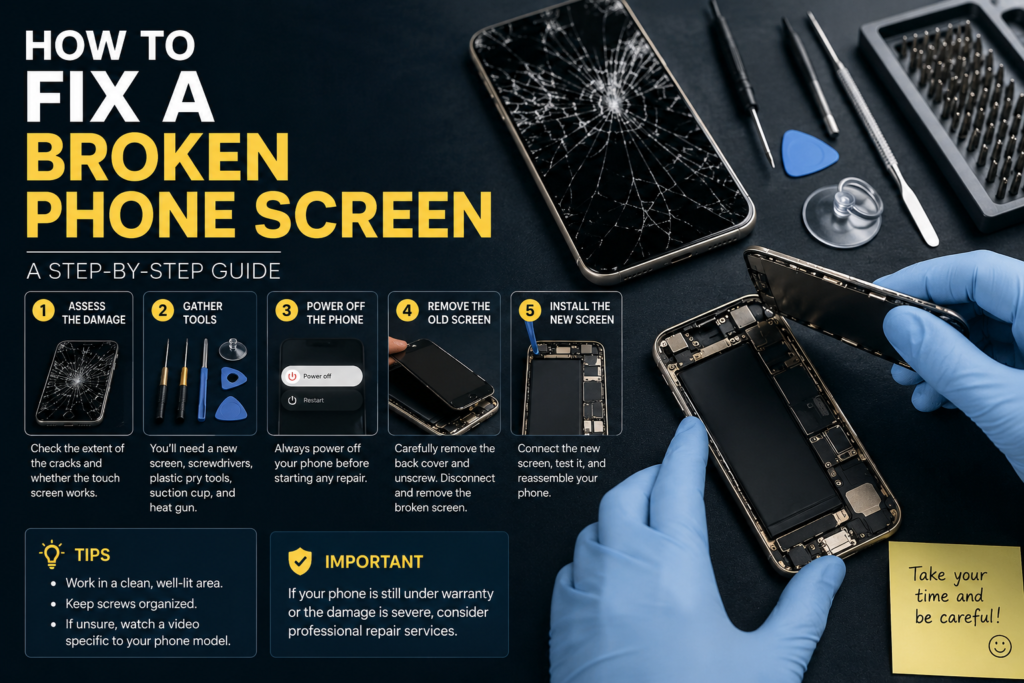
How to Replace a Broken Phone Screen Yourself
DIY screen replacement can save money, but it also carries risks. If done incorrectly, you may damage internal components or make the phone impossible to repair.
This option is best suited for users with experience repairing electronics.
Tools You’ll Need
Prepare the following tools before beginning:
- Replacement screen assembly
- Precision screwdriver set
- Plastic opening picks
- Suction cup
- Tweezers
- Heat gun or hair dryer
- Adhesive strips
- Microfiber cloth
- Small parts tray
Using the correct tools makes the repair safer and reduces the chance of damaging delicate connectors.
Step 1: Power Off the Phone
Always turn the phone off completely before opening it.
Disconnect any charging cables and remove the SIM card tray.
Step 2: Soften the Adhesive
Most modern smartphones use waterproof adhesive around the display.
Apply gentle heat around the edges using a heat gun or hair dryer for approximately one to two minutes.
Avoid overheating the phone, as excessive heat may damage internal components.
Step 3: Lift the Screen Carefully
Use a suction cup to create a small gap.
Insert a plastic opening pick into the gap and slowly work around the edges.
Never use metal tools that can scratch or puncture internal parts.
Step 4: Disconnect the Battery
Before disconnecting the display cable, unplug the battery connector.
This reduces the risk of electrical damage during the repair.
Step 5: Remove the Broken Display
Disconnect all display cables carefully.
Lift the damaged screen away from the frame.
Inspect the phone for broken glass fragments or leftover adhesive.
Step 6: Install the New Screen
Connect the replacement display without permanently sealing it.
Turn the phone on briefly to test:
- Display brightness
- Touchscreen response
- Fingerprint sensor (if applicable)
- Front camera
- Face recognition
Testing before final assembly helps avoid repeating the repair if something isn’t connected correctly.
Step 7: Reassemble the Phone
Once everything works properly:
- Apply fresh adhesive.
- Position the new screen.
- Press gently around the edges.
- Allow the adhesive to cure according to the manufacturer’s instructions.
Finally, reinstall the SIM card and test all phone functions again.
Common DIY Repair Mistakes
Even experienced repairers make mistakes. Avoid these common errors to improve your chances of a successful repair.
Buying the Wrong Replacement Screen
Always verify your exact phone model before ordering parts. Screens for similar models often look identical but use different connectors or dimensions.
Forgetting to Back Up Data
Although screen replacement doesn’t usually erase data, unexpected issues can occur. Creating a backup beforehand is always the safest approach.
Using Excessive Force
Modern smartphones contain delicate flex cables and connectors. Pulling too hard or rushing the repair can cause additional damage that is more expensive than the original cracked screen.
Reusing Old Adhesive
Old adhesive loses its strength over time. Applying fresh adhesive helps secure the new screen properly and reduces the risk of dust or moisture entering the device.
Skipping Function Tests
Always test the display, touchscreen, cameras, speakers, charging, and biometric sensors before sealing the phone completely. Discovering a problem afterward means reopening the device and repeating much of the repair process.
DIY Repair vs. Professional Repair
Replacing a phone screen yourself can save money, but it’s not always the best choice. The right option depends on your technical skills, the value of your phone, and the extent of the damage.
If you own an expensive flagship phone with an OLED display, professional repair is often worth the extra cost because it reduces the risk of additional damage and usually includes a service warranty.
| Factor | DIY Repair | Professional Repair |
| Cost | Lower | Higher |
| Skill Required | High | None |
| Risk of Damage | High | Low |
| Repair Time | 1–3 Hours | 30 Minutes–2 Hours |
| Warranty | Usually No | Often Included |
| Best For | Experienced Users | Most Smartphone Owners |
If you’re comfortable working with small electronics and have the correct tools, a DIY repair may be worthwhile. Otherwise, a trusted repair technician can complete the job more safely and efficiently.
Professional Phone Screen Repair
Professional repair is the safest solution for phones with severe damage, especially if the display no longer functions properly.
You generally have three repair options:
Manufacturer Repair Centers
Manufacturer-authorized service centers use genuine replacement parts and follow official repair procedures.
Advantages include:
- Genuine replacement screens
- Skilled technicians
- Repair warranty
- Better resale value
The downside is that manufacturer repairs can be more expensive and may require an appointment.
Authorized Repair Shops
Many brands work with certified repair partners that meet manufacturer standards. These shops often offer faster turnaround times while maintaining high repair quality.
Independent Repair Shops
Independent repair shops are often the quickest and most affordable option.
Before choosing one:
- Read customer reviews.
- Ask whether genuine or aftermarket parts are used.
- Confirm the repair warranty.
- Request a written price estimate.
A reputable repair shop should clearly explain the repair process and answer any questions before starting the work.
How Much Does Phone Screen Repair Cost?
Screen replacement costs vary depending on the phone model, display technology, and where the repair is performed.
Premium smartphones with OLED displays generally cost more to repair than budget models with LCD screens.
| Phone Brand | Typical Repair Cost | Average Repair Time |
| Apple iPhone | $150–$400 | 1–3 Hours |
| Samsung Galaxy | $180–$380 | 1–3 Hours |
| Google Pixel | $120–$300 | 1–2 Hours |
| Motorola | $80–$220 | 1–2 Hours |
| OnePlus | $120–$280 | 1–2 Hours |
| Xiaomi | $70–$220 | 1–2 Hours |
Actual prices depend on your specific model, replacement part quality, and labor charges in your area.
Should You Repair or Replace Your Phone?
Not every broken screen should be repaired. Sometimes replacing the entire device makes more financial sense.
Consider these factors before making your decision:
- The age of your phone
- Battery health
- Repair cost
- Software support
- Overall performance
- Physical condition
If repairing the phone costs nearly as much as replacing it, upgrading to a newer device may provide better long-term value.
Repair or Replace Decision Table
| Situation | Best Choice |
| Small surface crack | Repair Later |
| Cracked glass but working display | Repair |
| Screen replacement costs less than half the phone’s value | Repair |
| Multiple hardware issues | Replace |
| Phone is more than five years old | Consider Replacing |
| Battery is failing and screen is broken | Replace or Compare Total Repair Costs |
| Motherboard damage | Replace |
Common Phone Screen Repair Mistakes
Avoiding common mistakes can save you time and money.
Ignoring Small Cracks
Minor cracks often spread into larger fractures over time. Repairing them early is usually less expensive.
Buying Cheap Replacement Screens
Low-quality displays may have poor brightness, inaccurate colors, reduced touch sensitivity, or shorter lifespans.
Whenever possible, choose high-quality replacement parts.
Skipping Data Backup
Unexpected problems can occur during any repair. Backing up your important files beforehand protects your photos, contacts, and documents.
Applying Too Much Pressure
Pressing on a cracked display can worsen internal damage and even affect the display panel underneath.
Delaying Repairs
Waiting several months to repair a cracked screen increases the risk of moisture damage, dust buildup, and complete display failure.
How to Prevent Your Phone Screen from Breaking Again
Preventing damage is much easier than paying for another repair.
Use a Quality Protective Case
A shock-absorbing case helps reduce impact during accidental drops.
Look for features such as:
- Raised edges
- Reinforced corners
- Non-slip grip
- Military-grade drop protection
Install a Tempered Glass Screen Protector
A tempered glass protector absorbs much of the impact from everyday drops and scratches.
Replacing a screen protector is far less expensive than replacing the phone’s display.
Avoid Carrying Your Phone in Your Back Pocket
Many screens crack because people accidentally sit on their phones.
Keep your phone in a front pocket, bag, or dedicated compartment whenever possible.
Keep Your Phone Away from Hard Surfaces
Avoid placing your phone on the edge of tables, countertops, or other elevated surfaces where it can easily fall.
Handle Your Phone Carefully
Simple habits make a significant difference.
- Use both hands when possible.
- Don’t use your phone while running.
- Avoid texting while carrying heavy objects.
- Keep the device dry and clean.
Common Myths About Broken Phone Screens
Many repair myths continue circulating online. Believing them can make the damage worse.
Myth: Toothpaste Repairs Cracks
Fact: Toothpaste may polish tiny surface scratches but cannot repair cracked glass.
Myth: Rice Fixes Every Phone Problem
Fact: Rice does not repair broken screens or remove moisture effectively.
Myth: Liquid Screen Protectors Repair Cracks
Fact: Liquid protectors may add a thin protective coating, but they cannot restore broken glass.
Myth: Super Glue Is a Permanent Fix
Fact: Super glue can seep into buttons, speakers, or charging ports and make professional repairs more difficult.
Myth vs. Fact
| Myth | Reality |
| Toothpaste fixes cracks | False |
| Rice repairs damaged phones | False |
| Super glue repairs broken screens | False |
| Liquid screen protectors repair glass | False |
| Small cracks never spread | False |
Frequently Asked Questions
Can I still use my phone with a cracked screen?
Yes, if only the outer glass is cracked and the touchscreen works normally. However, use a screen protector to reduce the risk of cuts and schedule a repair before the damage worsens.
How do I know if only the glass is broken?
If the display remains bright, touch works correctly, and there are no black spots or colored lines, the damage may be limited to the outer glass. A technician can confirm this during an inspection.
Can I fix a broken phone screen for free?
There is no reliable free method to repair a cracked screen permanently. If your device is covered by accidental damage insurance or a protection plan, your repair costs may be reduced.
How long does a phone screen replacement take?
Most professional repairs take between 30 minutes and two hours, depending on the phone model and part availability.
Does replacing the screen erase my data?
A screen replacement usually doesn’t erase data, but backing up your phone before any repair is strongly recommended.
Can colored lines disappear on their own?
No. If colored lines appeared after the phone was dropped, they usually indicate display damage that requires screen replacement.
Conclusion
A broken phone screen doesn’t always mean you need a new device. The first step is determining whether the damage is cosmetic or affects the display itself. Minor cracks can often be managed temporarily with a tempered glass screen protector and a protective case, while severe issues like black spots, flickering, unresponsive touch, or colored lines typically require a full screen replacement.
If you’re confident in your repair skills and have the right tools, a DIY repair may save money. However, for premium smartphones or extensive damage, professional repair is usually the safer and more reliable choice. Acting quickly can prevent further damage, protect your data, and extend the life of your device.
By taking preventative measures such as using a durable case, installing a quality screen protector, and handling your phone carefully, you can significantly reduce the chances of another costly screen repair.
You May Also Read:meltem bozkurt conant